Render Says No Open Ports Detected? Fix Your Flask and Gunicorn Start
Deploy fails with Port scan timeout on Render? Bind to 0.0.0.0 and the PORT variable, fix the gunicorn command and run a bot with a health server.
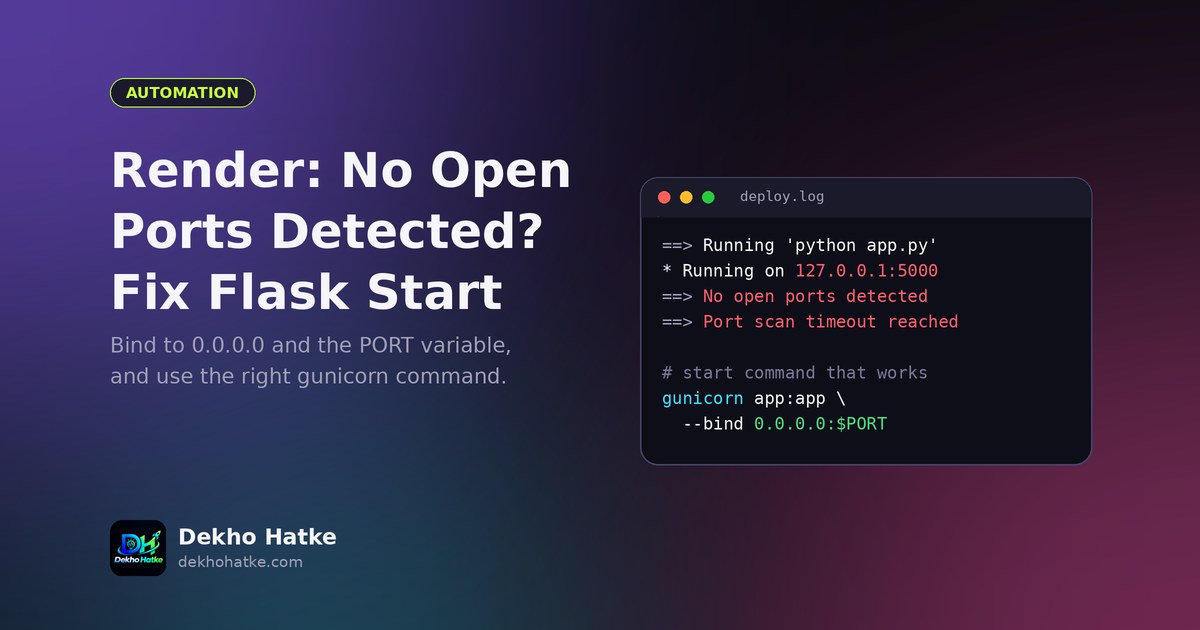
You push your Python project to GitHub, connect it to Render, press deploy, and the log scrolls happily until it stops on a line like this: No open ports detected on 0.0.0.0, continuing to scan. A few minutes later the deploy fails with Port scan timeout reached, failed to detect open port. Locally the same code works perfectly, so the failure feels unfair.
This article explains what Render is actually checking, lists every common reason the check fails for Flask, gunicorn and Telegram bot projects, and gives you working start commands, a minimal app and a tiny health server that you can paste into a bot that has no website at all. The advice applies to any Python web framework, including FastAPI and Django, because the problem is about how a process listens on a network port and not about Flask itself.
What Render checks after your app starts
When you create a Web Service, Render expects your program to behave like a web server. After the start command runs, Render looks for a program that is listening on a network port on all interfaces (the address 0.0.0.0). It also gives your program the port number it expects through an environment variable called PORT. For web services the default value is 10000, but you should never hard-code it, because Render can change it.
If Render finds a listening port, it marks the deploy as live and starts sending traffic to it. If it finds nothing within its time limit, it writes the two messages above and gives up. So the error simply means that, from the outside, your process never opened a port that Render could reach. The rest of the work is finding out why.
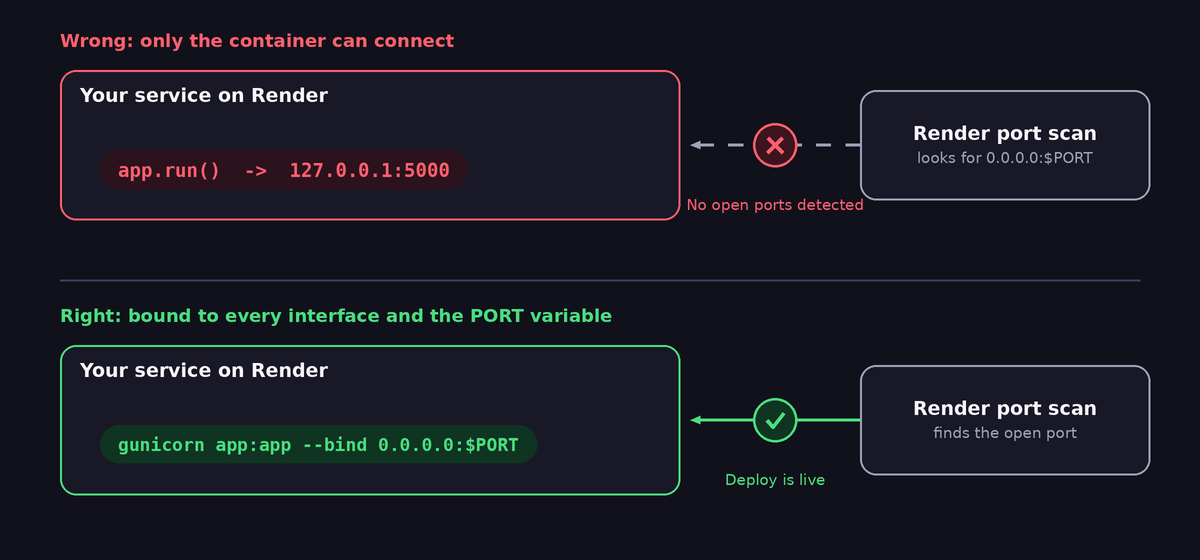
Cause 1: Flask is bound to localhost or to port 5000
The most common reason is the default behaviour of app.run(). If you write this:
from flask import Flask

app = Flask(__name__)

@app.route("/")
def home():
    return "Hello"

if __name__ == "__main__":
    app.run()
Flask listens on 127.0.0.1 port 5000. The address 127.0.0.1 means "this computer only", so nothing outside the container can connect, and port 5000 is not the port Render expects. The fix for a quick start is to read the port variable and listen on every interface:
import os
from flask import Flask

app = Flask(__name__)

@app.route("/")
def home():
    return "Hello"

if __name__ == "__main__":
    port = int(os.environ.get("PORT", 5000))
    app.run(host="0.0.0.0", port=port)
This is fine for learning, but it uses Flask's development server. For a real service use gunicorn, which is the next cause.
Cause 2: The start command does not use gunicorn correctly
On Render you set a Start Command in the service settings or in render.yaml. For Flask the standard command is:
gunicorn app:app --bind 0.0.0.0:$PORTRead it from left to right. gunicorn is the server. The first app is the Python file called app.py, without the extension. The second app after the colon is the variable inside that file that holds the Flask object. If your file is main.py and the variable is server, the command becomes gunicorn main:server --bind 0.0.0.0:$PORT. A wrong name does not always produce a friendly message. The worker may crash on import, gunicorn restarts it, and Render only ever sees "no open port".
Other things to check on this line:
- Make sure
gunicornis listed inrequirements.txt. Without it the start command fails immediately with "command not found". - If your app lives in a package or a sub-folder, either change the command to include the module path (for example
gunicorn backend.app:app) or set the Root Directory of the service to that folder. - Recent gunicorn versions read the
PORTenvironment variable by default, but writing--bind 0.0.0.0:$PORTmakes your intention explicit and works everywhere.
Cause 3: The app crashes before it ever opens the port
Render prints "No open ports detected" even when the real problem is a Python exception that happens during start. The port is never opened because the program is already dead. Scroll up in the deploy log and read the lines above the port message. You are looking for a traceback such as:
ModuleNotFoundError: a package is missing fromrequirements.txt, or its name differs from the import name.KeyError: 'DATABASE_URL'or similar: your code reads an environment variable that you set on your PC but not in the Render dashboard.- A Firebase, database or API call at import time that fails because credentials are missing or malformed.
SyntaxError: you used a newer Python feature than the Python version Render runs. Set thePYTHON_VERSIONenvironment variable to the version you developed with.
A useful habit is to run the exact start command on your own computer with the same environment variables. If it fails there with the same traceback, the problem has nothing to do with Render.
export PORT=10000
export BOT_TOKEN=test
gunicorn app:app --bind 0.0.0.0:$PORT
Then open http://127.0.0.1:10000 in your browser. If the page appears, your command and your code are fine.
Cause 4: Your project is a script, not a web server
A Telegram bot that polls for messages, a scraper that runs in a loop or a scheduled report script does not listen on any port. It makes outgoing connections only. If you deploy it as a Web Service, Render waits for a port that will never open.
You have three honest options:
- Deploy it as a Background Worker, which does not need a port. This is the correct service type for such programs, but check the current pricing on Render, because workers may not be available on the free plan.
- Run it as a Cron Job if it only needs to run on a schedule and then exit.
- Keep the Web Service type and add a very small web server next to your loop so that Render sees an open port. This is the common workaround on free plans and is shown below.
A tiny health server for a bot or a loop
This code starts a minimal HTTP server in a background thread. It answers OK on every request, which also gives an uptime monitor something to ping.
import os
import threading
from http.server import BaseHTTPRequestHandler, HTTPServer

class Health(BaseHTTPRequestHandler):
    def do_GET(self):
        self.send_response(200)
        self.send_header("Content-Type", "text/plain; charset=utf-8")
        self.end_headers()
        self.wfile.write(b"OK")

    def log_message(self, *args):
        pass  # keep the logs quiet

def start_health_server():
    port = int(os.environ.get("PORT", 10000))
    server = HTTPServer(("0.0.0.0", port), Health)
    t = threading.Thread(target=server.serve_forever, daemon=True)
    t.start()

if __name__ == "__main__":
    start_health_server()   # opens the port first
    run_my_bot_forever()    # your own loop, for example Telegram polling
Start the health server first, so the port is open within a second, and then run your long task. If you run a bot this way, read our guide to the Telegram 409 Conflict error, because a bot that restarts during deploys needs to avoid running twice.
Cause 5: The server starts too slowly
Render gives your service a limited amount of time to open a port. If your program loads a very large machine learning model, downloads files, builds a cache or waits for a slow database during start-up, the port may open too late. Move heavy work out of import time: let the server start first and load the data lazily on the first request or in a background thread. A server that listens quickly and warms up afterwards deploys reliably.
Cause 6: Wrong service type, language or settings
Check these basics in the dashboard before you dig deeper:
- Language must be Python, not Node or Docker, unless you really use a Dockerfile.
- Build Command is normally
pip install -r requirements.txt. If it is empty, no packages are installed. - Root Directory must point to the folder that contains
requirements.txtand your app file. This is the number one issue when a repository has several projects, for example apanelfolder and awebsitefolder. - Health Check Path (an optional setting) must be a path that returns a successful status. If you set
/healthbut your app has no such route, deploys may be marked as failed even though the app runs.
A render.yaml file in the root of your repository keeps these settings in one place and makes them reproducible:
services:
  - type: web
    name: my-api
    runtime: python
    buildCommand: pip install -r requirements.txt
    startCommand: gunicorn app:app --bind 0.0.0.0:$PORT --workers 1 --threads 4 --timeout 120
    healthCheckPath: /healthz
    envVars:
      - key: PYTHON_VERSION
        value: 3.11.9
Add a cheap route for the health check and for monitors:
@app.route("/healthz")
def healthz():
    return "ok", 200
Cause 7: Workers, threads and timeouts that hide the real error
Gunicorn starts a master process and one or more workers. If a worker takes longer than the timeout to answer (30 seconds by default), gunicorn kills it with a message about WORKER TIMEOUT. During a slow start this can look like the port never opens. For small free services, one worker with a few threads is enough and uses less memory. Out-of-memory kills are another silent reason: free instances have little RAM, so loading heavy libraries in several workers can exceed it. If the log ends abruptly with Killed or a message about running out of memory, reduce the workers to one and remove libraries you do not need.
Test the fix without waiting for a deploy
Waiting for a cloud build for every guess wastes time. Use this three-minute local routine instead:
- Create a fresh virtual environment and run
pip install -r requirements.txt. This proves that the requirements file is complete. - Set
PORTand every environment variable that the dashboard has. - Run the exact start command from Render.
- Visit the health route with a browser or with
curl http://127.0.0.1:10000/healthz.
If all four steps work on your machine, the same commands will work on Render. When something still differs, compare the Python version and the working directory, because those are the two things your PC and the server rarely share.
After the deploy works: free service behaviour
A free Render web service goes to sleep after a period without requests, and the next visitor waits for it to wake up. That first request can take half a minute. Anything that calls your service, such as a static website or a script, should therefore use a generous timeout and a retry. Our article on Python requests timeouts and retries shows a ready-made helper, and the guide on scheduling scripts with cron and Render explains how a monitor can keep the service awake. If a website on another domain calls your service from the browser, you will also meet CORS rules, which we cover in fixing the CORS error with a Flask API.
Quick checklist
- The log above the port message shows no traceback.
- The app listens on
0.0.0.0and on thePORTvariable. - The start command uses the right file and variable names:
module:variable. gunicornand every other package are inrequirements.txt.- Every environment variable your code needs exists in the dashboard.
- The service type matches the program: web server, worker or cron job.
- Heavy work does not run before the port opens.
- Root Directory and Python version are correct.
Frequently asked questions
Can I just hard-code port 10000?
It will often work today, but it is fragile. Reading PORT from the environment is one line and works on Render, on other hosts and on your own PC with a fallback value.
Why does it say continuing to scan and then fail?
Render keeps looking for an open port for a while. The first message is a progress note and the second is the final failure when nothing was found in time. Both point at the same cause.
My app works but the free service is very slow after some time idle. Is that the same error?
No. That is the normal sleep and wake behaviour of free instances. The deploy is healthy, and only the first request after a quiet period is slow.
Do I need Flask to see this error?
No. FastAPI with uvicorn needs uvicorn main:app --host 0.0.0.0 --port $PORT. Django needs gunicorn with the WSGI module. The rule is identical: listen on all interfaces and on the given port.
Final thoughts
"No open ports detected" sounds like a networking mystery, but it nearly always comes down to three questions. Does the program start without crashing? Does it listen on 0.0.0.0 and on $PORT? Is the service type right for what the program does? Answer those three honestly, test the start command locally, and your next deploy will go green.