Python requests Hangs or Fails Randomly? Timeouts, Retries and Sessions
A script that freezes or breaks on one bad response needs a timeout, a retry policy and a Session. Copy a hardened requests helper for any project.
Your Python script runs perfectly for a week, and then one night it simply stops. No error, no output, no crash. The process is still alive, but it does nothing. In the morning you find it frozen on a single line: requests.get(...). Or the opposite happens: the script works on most days, but once in a while a single failed request raises an exception, kills the whole run and wastes hours of work.
Both problems have the same root. The requests library is intentionally simple, and its defaults are not safe for scripts that run alone. By default there is no timeout, no retry and a new connection for every call. This guide shows you how to fix all three. You will learn what the different timeouts mean, how to set up retries with exponential backoff, how to use a Session, how to handle each kind of error and what to do when the server is a free instance that needs time to wake up. At the end you get a small, tested helper that you can paste into any project.
Why requests can wait forever
Look at this line, which appears in thousands of tutorials:
import requests

r = requests.get("https://example.com/api/data")
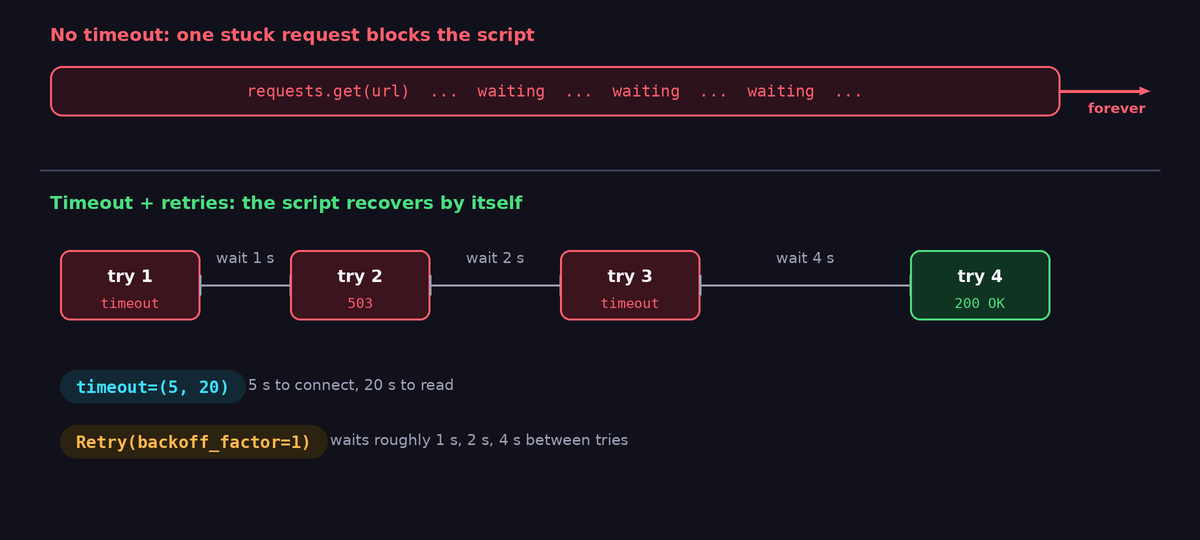
If the server accepts the connection and then never answers, because it is overloaded, stuck or silently dropped by a firewall, this line waits forever. The official documentation of requests states that it does not apply a timeout unless you set one. A network cable that is pulled, a Wi-Fi network that drops or a server that hangs are all enough to freeze your script permanently. For a one-off experiment that is merely annoying. For a scheduled script, a bot or a scraper, it is a serious bug, because the process holds on to resources and blocks all later work.
Step 1: Always set a timeout
Add a timeout argument to every call, with no exceptions:
r = requests.get("https://example.com/api/data", timeout=10)A single number applies to both phases of the request. It is better to understand the two phases, and to set them separately with a tuple:
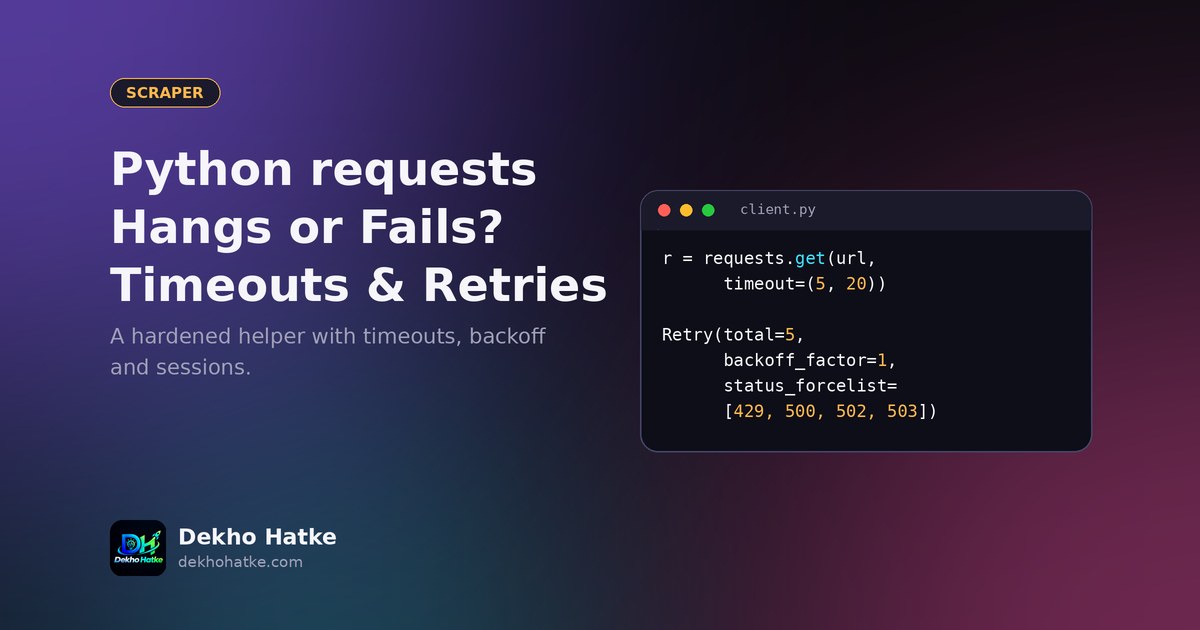
r = requests.get(url, timeout=(5, 30))The first value is the connect timeout: how long to wait to establish the connection to the server. Five seconds is plenty for a healthy server. The second value is the read timeout: how long to wait between bytes of the response, once the connection exists. Importantly, the read timeout is not a limit for the whole download. If the server sends one byte every 29 seconds, the request can last for hours. For a hard limit on the total time, you need a deadline in your own code, which is shown later.
Good starting values for typical APIs are a connect timeout of 5 seconds and a read timeout of 15 to 30 seconds. Use longer values for slow endpoints such as report generation, and use shorter ones for quick health checks.
Step 2: Know what can go wrong
A request can fail in several different ways, and they need different reactions. These exception classes are available from requests.exceptions:
ConnectTimeout: the connection could not be established in time. Often temporary.ReadTimeout: the server accepted the connection but answered too slowly.Timeout: the parent class of both timeouts above.ConnectionError: the network is down, the DNS lookup failed or the server refused the connection.HTTPError: raised byr.raise_for_status()when the status code is 4xx or 5xx.RequestException: the parent class of all of these. Catch it when you want to handle everything the same way.
Status codes also tell a story, even without an exception:
- 2xx: success.
- 4xx: your request is wrong (400 bad request, 401 unauthorised, 403 forbidden, 404 not found) or you are asking too often (429 too many requests). Retrying the same request without changing something is useless, except for 429, where you must wait.
- 5xx: the server has a problem (500, 502 bad gateway, 503 service unavailable, 504 gateway timeout). These are often temporary, and retrying is reasonable.
By default requests does not raise an error for 4xx and 5xx responses. If your code does r.json() on an error page, it fails with a confusing JSON error later. Call r.raise_for_status() right after the request, so the failure is reported at the place where it happened:
try:
    r = requests.get(url, timeout=(5, 20))
    r.raise_for_status()
    data = r.json()
except requests.exceptions.Timeout:
    print("The server is too slow, try again later.")
except requests.exceptions.HTTPError as e:
    print("Server answered with an error:", e.response.status_code)
except requests.exceptions.RequestException as e:
    print("Network problem:", e)
Notice that the more specific exceptions come first. Python checks the except blocks from top to bottom, and the first match wins.
Step 3: Retry the right errors, with waiting time
Many failures last only a few seconds: a short network glitch, a server restart, a deploy in progress. A good script tries again, but it does so with patience. If you retry instantly in a tight loop, you may overload a struggling server and make the problem worse. The standard technique is exponential backoff: wait one second, then two, then four, then eight, usually with a small random variation called jitter, so that many clients do not retry at the same moment.
You do not need to write this yourself. The urllib3 library, which requests uses internally, has a Retry class, and you attach it to a Session through an adapter:
import requests
from requests.adapters import HTTPAdapter
from urllib3.util.retry import Retry

def make_session():
    retry = Retry(
        total=5,
        connect=5,
        read=3,
        backoff_factor=1,                      # waits roughly 1s, 2s, 4s, 8s...
        status_forcelist=[429, 500, 502, 503, 504],
        allowed_methods=["GET", "HEAD", "OPTIONS"],
        respect_retry_after_header=True,
    )
    adapter = HTTPAdapter(max_retries=retry)
    s = requests.Session()
    s.mount("https://", adapter)
    s.mount("http://", adapter)
    s.headers.update({"User-Agent": "MyScript/1.0 (contact: [email protected])"})
    return s
Let us go through the options. total caps all retries together. backoff_factor controls the waiting time, which grows with each attempt. status_forcelist lists the status codes that should cause a retry, here the typical temporary ones. allowed_methods limits retrying to safe methods. This is important: a POST that creates an order or sends a message is not safe to repeat automatically, because the first attempt may have succeeded and only the answer was lost. If you retry it, the customer might receive two messages or be charged twice. Retry POST only when the API supports idempotency keys or when duplicates are harmless. And respect_retry_after_header=True tells the library to obey the server when it says "come back in 30 seconds".
A version note: older releases of urllib3 (before 1.26) call the option method_whitelist instead of allowed_methods. If you get an error about an unexpected keyword argument, upgrade urllib3 or use the old name.
Step 4: Use a Session
A Session object does three useful things. It reuses connections through connection pooling, so the second and following requests to the same server skip the slow handshake. This makes loops of many requests noticeably faster. It keeps cookies, which is required for sites that set a cookie at the first request. And it shares settings, such as headers and the retry policy above, across all calls.
session = make_session()

for page in range(1, 6):
    r = session.get(
        "https://example.com/api/products",
        params={"page": page},
        timeout=(5, 20),
    )
    r.raise_for_status()
    print(page, len(r.json()))
Note that the timeout is not a property of the session. You still pass timeout= on each call. Beginners often assume the session default carries it, and then find out the hard way. A small wrapper, shown below, solves this once and for all.
Step 5: A hard limit on the total time
Because the read timeout does not limit the entire transfer, a slow stream can still take far too long. For a strict ceiling, check the elapsed time while you read the response in chunks:
import time

def get_with_deadline(session, url, max_seconds=60, **kw):
    start = time.monotonic()
    with session.get(url, stream=True, timeout=(5, 15), **kw) as r:
        r.raise_for_status()
        chunks = []
        for chunk in r.iter_content(chunk_size=65536):
            chunks.append(chunk)
            if time.monotonic() - start > max_seconds:
                raise TimeoutError("download took longer than %d seconds" % max_seconds)
        return b"".join(chunks)
Use time.monotonic() for measuring durations. It is not affected by changes of the system clock, unlike time.time(). This pattern is helpful for downloads of files, reports and large JSON responses.
Special case: servers that sleep
Free hosting plans often put a service to sleep after a period without traffic. The first request that arrives afterwards wakes it up, and it can take 30 to 60 seconds to answer. If your timeout is 10 seconds, the first request fails every time, even though the server is healthy and the second attempt would work.
For such targets, use a longer read timeout on the first call and let retries absorb the rest. A practical approach is a "wake up" call to a cheap endpoint with a generous timeout, followed by the real calls:
def wake_up(session, base_url):
    try:
        session.get(base_url + "/healthz", timeout=(5, 60))
    except requests.exceptions.RequestException:
        pass   # the real call will retry and report errors properly
If you control the server, a monitor that pings it every few minutes keeps it awake, as explained in our guide to scheduling scripts with cron and Render. If you deploy your own service and see port errors, this article on Render's "No open ports detected" message will help.
A reusable helper
Put everything together in one small module that you copy into your projects. It adds the retry policy, a default timeout for every call, a descriptive User-Agent and logging of failures:
import logging
import requests
from requests.adapters import HTTPAdapter
from urllib3.util.retry import Retry

log = logging.getLogger("http")

class Client:
    def __init__(self, base_url="", timeout=(5, 20), retries=4, user_agent="MyScript/1.0"):
        self.base_url = base_url.rstrip("/")
        self.timeout = timeout
        retry = Retry(
            total=retries,
            backoff_factor=1,
            status_forcelist=[429, 500, 502, 503, 504],
            allowed_methods=["GET", "HEAD", "OPTIONS"],
            respect_retry_after_header=True,
        )
        self.s = requests.Session()
        adapter = HTTPAdapter(max_retries=retry)
        self.s.mount("https://", adapter)
        self.s.mount("http://", adapter)
        self.s.headers["User-Agent"] = user_agent

    def get_json(self, path, **kw):
        kw.setdefault("timeout", self.timeout)
        url = path if path.startswith("http") else self.base_url + "/" + path.lstrip("/")
        try:
            r = self.s.get(url, **kw)
            r.raise_for_status()
            return r.json()
        except requests.exceptions.RequestException as e:
            log.warning("GET %s failed: %s", url, e)
            raise
Use it like this:
api = Client("https://example.com/api")
products = api.get_json("products", params={"page": 1})
When all retries are used up, the exception is raised and you decide what to do: skip this item, stop the run or send an alert. That decision belongs to the caller and not to the HTTP layer. For alerts, a Telegram message is the simplest way, and this tutorial on a Telegram bot that reports to you has the code.
Parsing mistakes that look like network errors
Not every failure comes from the network. If r.json() raises JSONDecodeError, the server returned something that is not JSON, often an HTML error page or an empty body. Print r.status_code, r.headers.get("Content-Type") and the first 200 characters of r.text before you blame your parsing code. If the page is HTML where you expected data, the cause may be that the website loads its data with JavaScript, which is covered in our article about finding the hidden JSON API behind a page.
Be polite when you retry
Retries and loops multiply requests. Keep the load reasonable: add a short time.sleep between calls in loops, cache results on disk while developing, and respect 429 and Retry-After responses. If a site tells you to slow down, slow down. For scraping, read the terms of use and robots.txt first, and prefer an official API when one exists.
Checklist for every script that calls an API
- A
timeouton every call, as a(connect, read)tuple. raise_for_status()after every request.- A
Sessionwith aRetrypolicy for temporary errors. - Retries only for safe methods, unless duplicates are harmless.
- A total deadline for large downloads.
- Longer timeouts or a wake-up call for servers that sleep.
- Logging of every failure and an alert for repeated failures.
- Delays between requests, and respect for
Retry-After.
Frequently asked questions
What timeout value should I use?
For most APIs, a connect timeout of 3 to 5 seconds and a read timeout of 10 to 30 seconds work well. Adjust to the real behaviour of your target. Measure how long normal responses take, and set the read timeout to a few times that value.
Does timeout=10 mean the whole request is limited to 10 seconds?
No. It applies separately to the connection phase and to the waiting time between received bytes. A slowly trickling response can last much longer. Use a deadline in your code if you need a hard limit.
Should I retry on every exception?
No. Retry temporary conditions: timeouts, connection errors and the 429 and 5xx status codes. Do not retry 400, 401, 403 or 404 without changing something, because the result will be the same.
Is it safe to retry POST requests?
Only if repeating the action is harmless or the API provides an idempotency mechanism. Otherwise a retry after a lost response can create duplicates.
Why does my script work in the terminal but hang under cron?
The network or environment may differ, but without a timeout one stuck request is enough to block the job. Add timeouts, and read our article about cron jobs that do not run for the other differences.
Final thoughts
Reliable scripts are not clever, they are careful. Set a timeout on every call, check the status, retry only what is safe to retry, reuse a session and tell yourself when something fails. These few habits turn a script that freezes once a month into one that you can leave alone for a year.