Fix the CORS Error When Your Static Website Calls a Flask API
Blocked by CORS policy in the browser console? Learn what preflight is and fix it in Flask, including credentials, redirects and error responses.

You built a small static website with plain HTML and JavaScript, you wrote a Flask API on another address, and the first time the page calls the API the browser console shows a red message: Access to fetch at 'https://api.example.com/data' from origin 'https://example.com' has been blocked by CORS policy. The API works fine in Postman, in curl and in the browser address bar, so it feels like the server is lying to you.
The server is not lying, and your JavaScript is not wrong. CORS is a safety rule that the browser enforces, and the fix lives in the response headers that your Flask server sends. This guide explains the rule in plain language, shows the exact headers you need, gives you code for Flask with and without the flask-cors package, and walks through the five situations that still fail after you "enabled CORS", such as preflight redirects, credentials and error responses without headers.
Why the browser blocks the request
A page loaded from https://example.com is allowed to send requests to https://api.example.com, but by default it is not allowed to read the answer. The reason is protection. Imagine you are logged in to your bank in one tab, and a malicious page in another tab silently sends requests to the bank. Without a rule, that page could read your account data. So browsers follow the same-origin policy: a script may read responses only from the same origin as the page.
An origin is the combination of three things: the scheme (http or https), the host (example.com) and the port (443). If any of the three differ, the origin differs. Each of these is a different origin from https://example.com:
http://example.com(different scheme)https://api.example.com(different host)https://example.com:8000(different port)http://localhost:5500versushttp://localhost:5000while testing (different port)
CORS, short for Cross-Origin Resource Sharing, is the official way for a server to say: "Scripts from this other origin are allowed to read my answers." The server says it with a response header called Access-Control-Allow-Origin. If the header is missing or names a different origin, the browser throws the response away and prints the error you saw. Notice what this means: the request usually did reach your server, and your server probably answered with status 200. The browser refused to hand the answer to your script. That is why curl and Postman work, because they are not browsers and do not enforce the policy.
The smallest fix in Flask
The shortest correct fix is to add the header to every response. In Flask you can do it with an after_request function:
from flask import Flask, jsonify

app = Flask(__name__)

ALLOWED = {"https://example.com", "https://www.example.com"}

@app.after_request
def add_cors(resp):
    from flask import request
    origin = request.headers.get("Origin", "")
    if origin in ALLOWED:
        resp.headers["Access-Control-Allow-Origin"] = origin
        resp.headers["Vary"] = "Origin"
    return resp

@app.route("/api/data")
def data():
    return jsonify({"message": "hello"})
Instead of writing *, the code compares the incoming Origin header against a list of origins that you trust and echoes it back. The Vary: Origin header tells caches that the answer depends on who asked, which prevents a cache from handing one site's header to another site. The wildcard * is acceptable only for truly public data, for example an open read-only API with no login. For anything connected to users, a licence or an account, list your origins explicitly.
Understand preflight, because it causes most surprises
Some requests are sent immediately. Others are preceded by a preflight: the browser first sends an OPTIONS request to ask for permission, and only if the answer is positive does it send the real request. A request needs a preflight when it is not "simple". The usual triggers are:
- the method is
PUT,PATCHorDELETE, - the
Content-Typeisapplication/json, - you send a custom header such as
AuthorizationorX-Api-Key.
That second trigger catches almost everyone. A fetch with headers: {"Content-Type": "application/json"} always causes a preflight. Your Flask route may only accept POST, so the OPTIONS request gets a 405 or 404, the browser sees no permission headers, and it reports a CORS failure. The console message in this case mentions the preflight request.
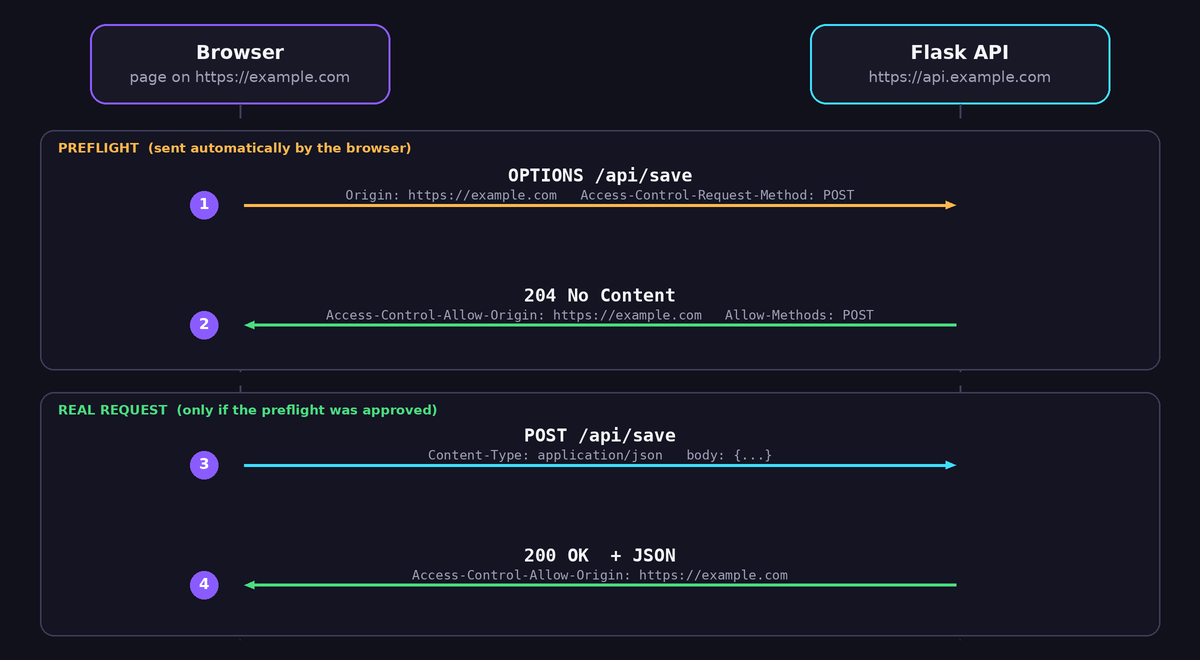
A correct preflight answer carries these headers:
Access-Control-Allow-Origin: the allowed origin.Access-Control-Allow-Methods: for exampleGET, POST, OPTIONS.Access-Control-Allow-Headers: the request headers you allow, for exampleContent-Type, Authorization.Access-Control-Max-Age: how many seconds the browser may remember the permission, so it does not send a preflight for every call.
Here is a complete version that handles preflight in plain Flask:
from flask import Flask, request, jsonify, make_response

app = Flask(__name__)
ALLOWED = {"https://example.com", "https://www.example.com"}

def cors(resp):
    origin = request.headers.get("Origin", "")
    if origin in ALLOWED:
        resp.headers["Access-Control-Allow-Origin"] = origin
        resp.headers["Vary"] = "Origin"
        resp.headers["Access-Control-Allow-Methods"] = "GET, POST, OPTIONS"
        resp.headers["Access-Control-Allow-Headers"] = "Content-Type, Authorization"
        resp.headers["Access-Control-Max-Age"] = "600"
    return resp

@app.before_request
def preflight():
    if request.method == "OPTIONS":
        return cors(make_response("", 204))

@app.after_request
def after(resp):
    return cors(resp)

@app.route("/api/save", methods=["POST"])
def save():
    body = request.get_json(silent=True) or {}
    return jsonify({"ok": True, "got": body})
The before_request hook answers every OPTIONS request with an empty 204 response and the headers, before your route logic runs. The after_request hook adds the headers to real answers.
The easier way: the flask-cors package
Writing this yourself teaches you how it works, but the flask-cors package does the same thing with less code and fewer mistakes. Install it with pip install flask-cors and add it to requirements.txt:
from flask import Flask, jsonify
from flask_cors import CORS

app = Flask(__name__)

CORS(app, resources={r"/api/*": {"origins": ["https://example.com", "https://www.example.com"]}})

@app.route("/api/data")
def data():
    return jsonify({"message": "hello"})
With the resources argument you limit CORS to routes that start with /api/, so the rest of your site is not affected. You can also decorate a single route with @cross_origin(origins=[...]). The package answers preflight requests automatically.
The fetch code on the page
The JavaScript side is short. Notice that you do not set any CORS headers in the browser, because only the server can grant permission:
async function save(payload) {
  const res = await fetch("https://api.example.com/api/save", {
    method: "POST",
    headers: { "Content-Type": "application/json" },
    body: JSON.stringify(payload),
  });
  if (!res.ok) throw new Error("Server answered " + res.status);
  return res.json();
}
If you only need to avoid a preflight for a simple POST, you can send the body as text/plain and parse the JSON on the server with request.get_data() and json.loads. This is a legitimate trick that removes one network round trip, which is useful when the server is a free instance that takes time to wake up. Use it only when you understand the trade-off: you give up automatic JSON parsing on the server.
Five situations that still fail after you enabled CORS
1. The error response has no CORS headers
Your success path works, but when the server returns a 400, 404 or 500 error, the browser shows a CORS error instead of the real message. Why? Many frameworks produce error pages outside your normal response path, and the headers were never added. With after_request or flask-cors the headers are added to error responses handled by Flask, but a crash inside gunicorn, a proxy timeout or a 502 from a hosting platform comes from a different layer, and it has no CORS headers at all. If the console says CORS but the Network tab shows status 500, 502 or 504, look at the server logs first. The CORS message is only a side effect.
2. A redirect during preflight
Preflight requests must not be redirected. A very common case is a trailing slash. Your route is /api/save/, the page calls /api/save, and Flask answers with a 308 redirect. The browser rejects a redirected preflight and prints a CORS error. The same happens when a request is sent to http:// and the server redirects to https://. Fix it by calling the exact final URL, with the correct scheme and trailing slash. In Flask you can also set app.url_map.strict_slashes = False so both forms match without redirecting.
3. Credentials and cookies
If you send cookies or an Authorization header with credentials: "include", the rules become stricter. The server must answer with Access-Control-Allow-Credentials: true, and Access-Control-Allow-Origin must be one exact origin, never *. If you use supports_credentials=True in flask-cors, list the origins explicitly. Also remember that modern browsers restrict third-party cookies, so a cookie set by api.example.com for a page on example.com can be blocked even when CORS is correct. Using an Authorization header or a token in the request body avoids the cookie problem.
4. Two sets of headers or a repeated header
If your Flask code adds the header and a reverse proxy such as Nginx or a Cloudflare rule also adds it, the browser may see Access-Control-Allow-Origin twice and reject it with a message that says the header contains multiple values. Add the header in exactly one place.
5. A typo in the origin
https://example.com/ with a trailing slash is not an origin. The correct value has no path and no slash. Another classic mistake is forgetting www, or listing http:// while the site runs on https://. Copy the origin from the console error, because it prints the exact value the browser sent.
A cleaner alternative: avoid CORS completely
You can sidestep the whole topic by making the browser talk only to its own origin. If your static site is hosted on a platform that supports a small server-side function, for example a Cloudflare Pages worker, you can send requests to /api/... on the same domain and let the worker forward them to your Flask server. The browser sees same-origin requests, so no CORS headers are needed, and your real server address stays out of the page source. The cost is a slightly more complex deployment and one more component to maintain.
Both ways are valid. Direct calls with correct CORS headers are simple and fast. A same-origin proxy hides the backend and removes the CORS category of errors, but it adds a hop and its own timeouts. If your backend sleeps on a free plan, you can read about fixing Render deploy errors and handling timeouts and retries in Python to make the whole chain dependable.
How to debug a CORS error in two minutes
- Open the browser DevTools and go to the Network tab. Reproduce the error.
- Find the failing request. If there are two entries with the same URL, the first with method
OPTIONSis the preflight. - Check the status code. A 4xx or 5xx on the preflight means your server does not handle
OPTIONS. - Open Response Headers and look for
Access-Control-Allow-Origin. Is it there? Does it match the page origin exactly? - For a preflight, check that
Access-Control-Allow-Headerscontains every header yourfetchsends, and thatAccess-Control-Allow-Methodscontains your method. - Test the server outside the browser with a command that pretends to be your page:
curl -i -X OPTIONS https://api.example.com/api/save \
  -H "Origin: https://example.com" \
  -H "Access-Control-Request-Method: POST" \
  -H "Access-Control-Request-Headers: content-type"
The -i flag prints the response headers. If the headers listed above are missing in this output, the bug is on the server. If they are present here but the browser still complains, compare the origin character by character.
Frequently asked questions
Can I fix CORS from my JavaScript?
No. The browser decides based on headers sent by the server. Settings such as mode: "no-cors" do not fix anything: they give you an opaque response that your code cannot read.
Is it safe to use the wildcard *?
It is safe for public data that anyone may read, such as a public price list. It is not safe, and not even allowed with credentials, for APIs tied to accounts or licences. Prefer an explicit list of origins.
Why does it work on localhost but not after deployment?
Your local test probably used the same port or a development proxy, or you allowed only http://localhost. After deployment the page origin changes to your real domain, so you must add it to the allowed list.
Do browser extensions that disable CORS solve it?
They help only on your own computer and hide the problem. Your visitors will still see the error, so fix the server.
Does CORS protect my API from abuse?
No. CORS only controls what browsers let scripts on other websites read. Anyone can still call your API with curl or a script. Protect sensitive endpoints with authentication, rate limits and validation on the server.
Final thoughts
A CORS error is a permission problem, and the permission has to come from the server. Allow the exact origin, answer the OPTIONS preflight, make sure error responses and redirects do not drop the headers, and take extra care when credentials are involved. When you follow the debugging routine above, you will find the cause in a few minutes instead of changing random settings for an evening.